Platform Setup
Bed Presence Mk1 is compatible with the open platforms you already use. Visit the GitHub repository for YAML configs, binary firmware files, and platform drivers.
- In Home Assistant navigate to Settings -> Devices & services.
-
You should see a discovered item (e.g. Bed Presence xxxxxx).
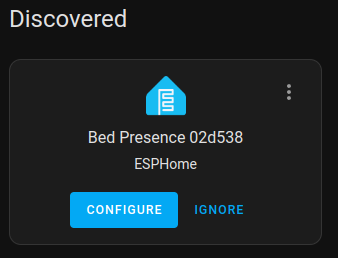
-
Click Configure then Submit. If desired, specify an area and click Finish.
- Your device is ready to use!
Tip
Adoption into the ESPHome Builder is only necessary if you would like to take full control over the firmware on the device (advanced). Note that you will loose access to OTA managed firmware updates directly from Elevated Sensors.
- Navigate to the product's GitHub repository (see above).
- Navigate to Releases.
- Right click on the hubitat-bundle.zip and copy the link.
- In Hubitat, navigate to Bundles in the left-side menu (expand the For Developers section if you do not see Bundles, or turn on Enabled advanced/developer options in Settings if you do not see the For Developers section).
- Select the Import ZIP button (towards the top of the page).
- Select Import from URL and paste the copied link into URL to import bundle from. Leave all other settings as default.
- Select Import and wait for the process to finish. The text Bundle imported will appear at the bottom of the dialog when the process is complete, and the dialog with close shortly afterwards. You will then see the bundle in the table on the Bundles page.
- Next, navigate to Devices.
- Select Add device.
- Under Add device manually, select Virtual.
- Using the drop-down, search for Elevated Sensors and select your device (e.g. Elevated Sensors Bed Presence Mk1).
- Select Next.
- Name your device and select Next.
- Select a room and select Next.
- Select View device details.
- Under Preferences, enter the Device IP Address (this can be an IP address or mDNS address) and hit Save Preferences.
- Your device is ready to use!
Warning
The Homey app is a creation of the community and is not officially supported.
- Install the device using the Community App.
- Having an issue with the app? Contact the developer via the Hommey Community Forum.